
Spam Trap Emails vs. Disposable Emails: Which is More Dangerous?
You see a surge in email signups and celebrate—until your deliverability tanks by 50%. You likely hit a spam trap. Here is how to distinguish these 'landmines' from simple disposable emails and keep your sender reputation intact.
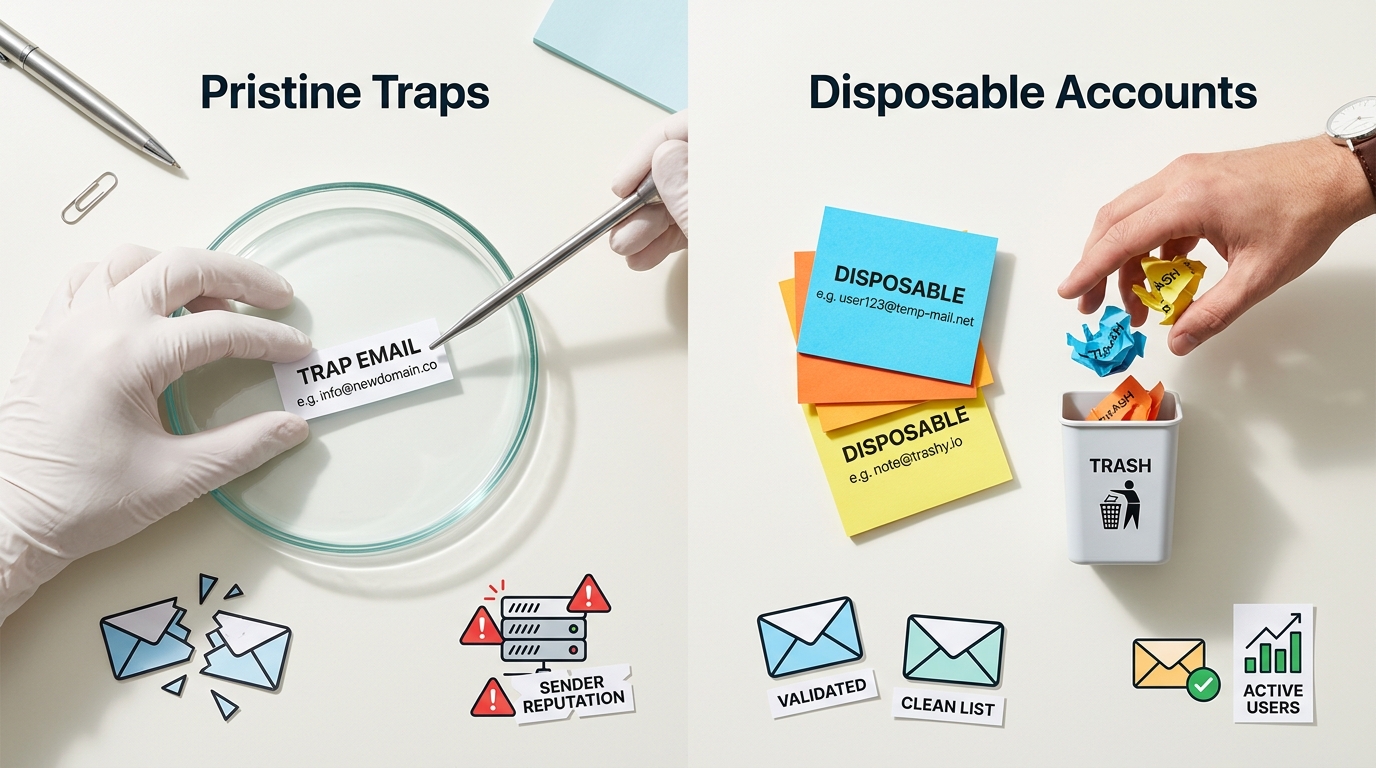
Your email campaign is humming along until, suddenly, your open rates fall off a cliff. You didn't change your subject lines or your offer, but your messages aren't reaching the inbox anymore.
You have likely hit a spam trap, the invisible tripwire of the email world. These addresses are designed to look exactly like real users, but they exist solely to destroy your sender reputation if you use sloppy list-building tactics.
Hitting one of these silent traps is like stepping on a landmine. While other issues might give you a warning, a single hit on a high-quality trap can halt your entire delivery system in hours.
That's the real danger. You won't get a polite notification; you'll simply find yourself permanently blocked by major providers without a clear path back to the inbox.
The TL;DR: Traps vs. Disposables
The difference between a spam trap and a disposable email is the intent of the recipient. A spam trap is a tool used by security firms to penalize you, while a disposable address is a tool used by humans to avoid you.
50% potential drop in deliverability following a single pristine spam trap hit.
- Spam Traps: High-risk addresses that can cause immediate domain-wide blacklisting.
- Disposable Emails: Temporary accounts that cause high hard-bounce rates and ruin your campaign metrics.
- The Verdict: Spam traps are significantly more dangerous because they attack your ability to send mail to anyone on your list.
What Is a Spam Trap Email? The Three Primary Types
A spam trap is essentially a fake account that never signed up for your mail. Because these addresses have no human owner, there is zero reason for them to be on a legitimate, permission-based marketing list.
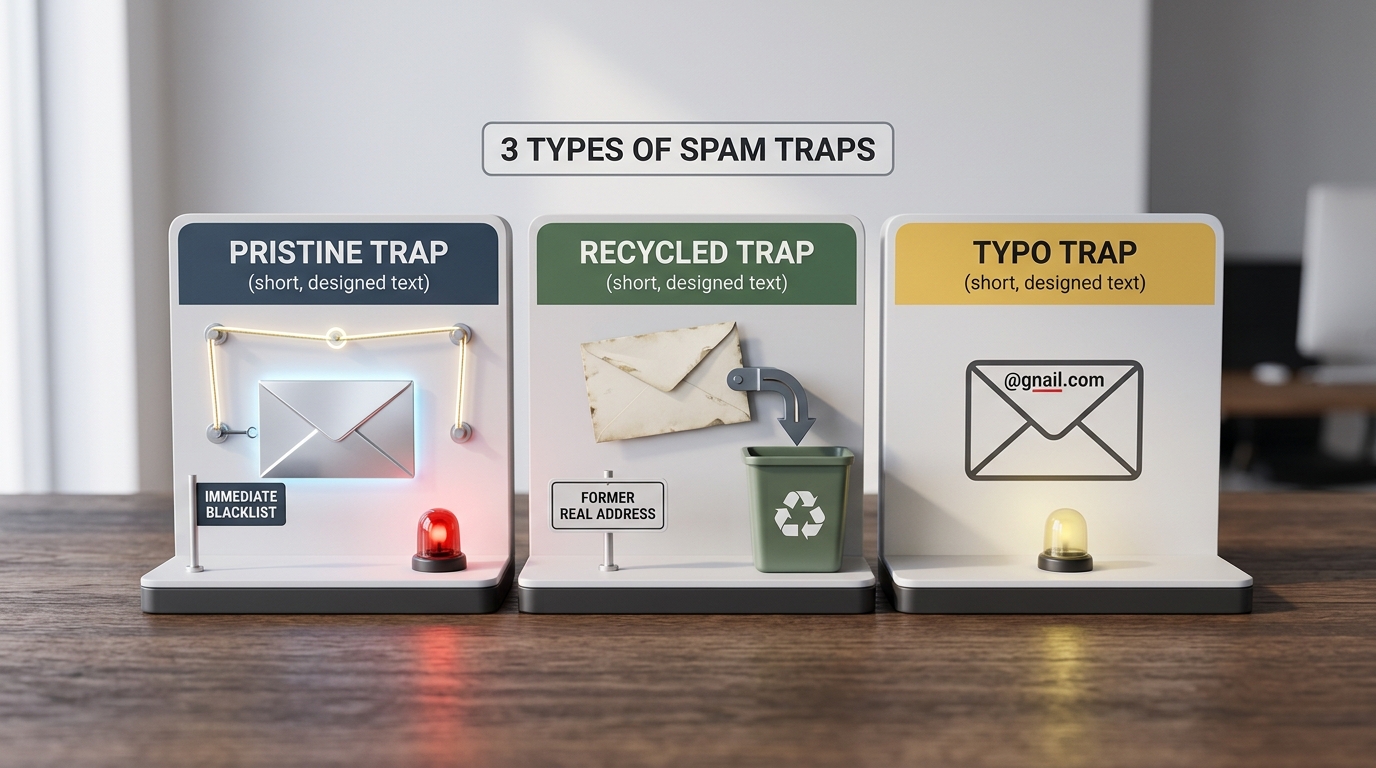
- Pristine Spam Traps These are the most dangerous. They are created by ISPs and anti-spam organizations like Spamhaus and placed on public websites where only scraping bots can find them. If you hit one, it is proof you are using harvested lists or scrapers, which usually leads to immediate blacklisting of your IP.
- Recycled Spam Traps These were once real email addresses used by actual people. After a typical period of six months of inactivity, the ISP deactivates the account and later reactivates it as a trap. Sending to these indicates that your list hygiene is failing and you are not removing unengaged users.
- Typo Spam Traps
These target common mistakes like
user@gnail.comoruser@yaho.com. They are used to identify senders who do not use real-time validation or double opt-in to verify the accuracy of their data at the point of entry.
Here is why this matters: Hitting a pristine trap can lower your deliverability by 50% in a single day. ISPs assume that if you have one trap, your entire list is likely compromised or unverified.
Consider a B2B marketing team that decides to supplement their organic growth by purchasing a lead list from a third-party vendor. Among the thousands of entries is a single pristine trap hidden in a website footer five years ago. Within 24 hours of the first blast, their corporate domain is flagged, and even their one-on-one sales emails begin bouncing across the board.
Comparison of Trap Severity
| Trap Type | Source | Impact | Recovery |
|---|---|---|---|
| Pristine | Security Firms | Immediate Blacklist | Difficult |
| Recycled | Old Users | Reputation Decline | Moderate |
| Typo | Domain Typos | Increased Bounces | Easy |
What Is a Disposable Email? The Temporary Privacy Tool
Disposable email addresses are the temporary burner phones of the internet. Real people create them using services like 10 Minute Mail or Mailinator to access gated content without giving away their real identity.
While they don't carry the same reputation 'poison' as spam traps, they are a massive drain on your resources. Once the temporary session ends—often in minutes—any mail you send will result in a hard bounce, which negatively impacts your sender score over time.
Because these users never intend to read your marketing, they also skew your engagement data. You can identify and block these at the source by using tools like IsFakeMail, which uses a real-time API to check signups against a database of over 187,000 known disposable domains.
- Intent: Privacy protection for the user.
- Lifespan: Usually minutes to a few days.
- Risk: High bounce rates and wasted marketing spend.
The Direct Comparison: Traps vs. Disposables
Understanding the mechanics of each threat helps you prioritize your defense. While both hurt your ROI, one is a nuisance and the other is a business-killing catastrophe.

Threat Comparison
| Feature | Spam Traps | Disposable Emails |
|---|---|---|
| Primary Goal******* | To identify and punish spammers | To protect user privacy |
| Created By******* | ISPs and anti-spam organizations | Individual users and bots |
| Immediate Danger******* | IP and domain-wide blacklisting | High hard-bounce rates |
| Metric Impact******* | Silent; usually shows zero engagement | High bounces and skewed open rates |
| Detection******* | Hard to find; they accept mail silently | Easy to spot with domain verification |
| Main Consequence******* | Your mail is blocked by the receiver | You waste money on fake leads |
Spam traps are specifically designed to be silent. They often accept your email without bouncing so they can continue to feed data back to blocklists. This makes them nearly impossible to detect without advanced hygiene tools that look for non-engagement patterns.
How to Cleanse Your List and Evade the Traps
Evading these threats requires a proactive system rather than a one-time cleanup. You must build a wall around your list that filters out bad actors before they can enter your database.
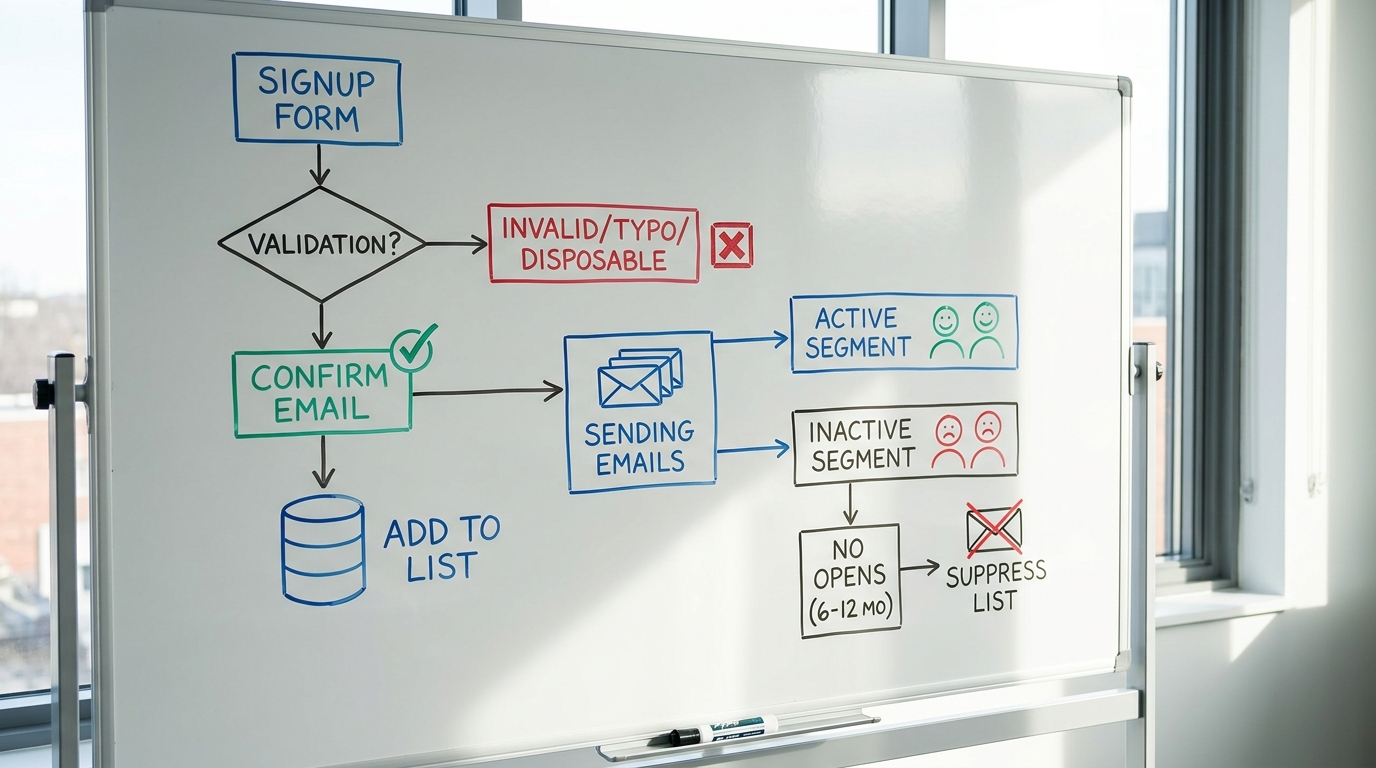
- Implement Double Opt-In (DOI) This is the single most effective way to stop spam traps. Since traps don't have humans behind them, they will never click the confirmation link in your welcome email, ensuring they never reach your active mailing list.
- Use Real-Time Validation Add an API to your signup forms to catch typos and disposable domains instantly. This prevents the 'gnail.com' typo traps and keeps temporary accounts from polluting your CRM at the point of entry.
- Monitor Reputation Tools Use Google Postmaster Tools to keep an eye on your domain reputation. If you see a sudden spike in 'spam rate' without a change in volume, you have likely hit a trap.
- Prune Unengaged Subscribers If a subscriber hasn't opened an email in 6 to 12 months, stop emailing them. Recycled traps are created from these abandoned accounts, and continuing to mail them is a liability.
Tip: If you suspect you have already been blacklisted, use the Spamhaus Blocklist Check to see if your IP or domain is listed and follow their specific removal instructions.
List Hygiene Checklist
- Use double opt-in for all new lead magnets.
- Block disposable domains at the signup form level.
- Run a full list cleaning every 3 to 6 months.
- Suppress users who have zero activity for over 180 days.
- Check bounce logs for unusual clusters of rejected mail.
The Deliverability Toolbox: Essential Tech
Building a reliable delivery system requires a mix of real-time prevention and periodic deep cleaning. These tools focus on different aspects of list health, from catching temporary accounts to identifying known trap domains.
- Webbula Email Hygiene: Excellent for identifying advanced threats like pristine spam traps and malicious bots that standard verifiers miss.
- ZeroBounce or NeverBounce: Reliable for bulk list cleaning to identify typos and recycled accounts in existing databases.
- IsFakeMail: A high-speed, free API for detecting disposable and temporary email addresses during the signup process.
Decision Rules
- If you need to stop fake account signups for free, use IsFakeMail.
- If you are mailing a list that hasn't been touched in a year, use ZeroBounce or NeverBounce.
- If your deliverability is crashing despite low bounce rates, use Webbula to hunt for hidden traps.
Frequently Asked Questions
How do you know if you hit a spam trap?
The most common symptom is a sudden drop in deliverability to major providers like Gmail or Outlook. You might also notice segments of your list showing 100% open rates with zero clicks, as some security filters 'open' mail to check for malicious links.
Can email verification remove all spam traps?
No tool can identify 100% of pristine spam traps because they are kept secret by security firms. However, high-quality verification tools are excellent at removing recycled traps and typo traps by checking domain activity and MX records.
How long before an email is recycled into a trap?
Most ISPs follow a six-month window. The address is deactivated for several months to allow for hard bounces, then it is reactivated as a trap to catch senders who are not managing their bounce logs or suppression lists.
Are disposable emails illegal to use?
Not at all. They are a legitimate privacy tool for users who want to avoid marketing spam. However, for a business, they represent low-quality leads that will never convert and eventually harm your sender score.
Safeguarding Your Sender Reputation
Disposable emails are a hurdle for your marketing metrics, but spam traps are an existential threat to your entire business communication. One costs you money on lead spend; the other can take your domain offline for weeks.
Maintaining a clean list is not a task you complete once and forget. It is an ongoing commitment to permission-based marketing and technical vigilance.
Protect your reputation by validating every entry at the door and letting go of subscribers who no longer engage. Start by checking your current list for hidden risks today.