
Inside the Tech: How Does 10 Minute Mail and Temp Mail Work?
Disposable email services aren't magic; they are masterclasses in ephemeral server architecture. We break down the 10 technical stages that allow 10-minute mail to function without leaving a digital footprint.
The modern web has become a landscape of mandatory registration gates. Every newsletter or whitepaper requires an email address, which usually results in a lifetime of unwanted marketing sequences.
Temporary email services offer a digital burn-after-reading solution. They allow you to bypass these barriers without exposing your real identity or cluttering your primary inbox. The tech behind these services is not fake. It uses the same protocols as major providers but with a built-in self-destruct mechanism.
Tip: Use temporary email for one-time verification codes to keep your primary inbox clean from marketing follow-ups.
The TL;DR Of Temporary Email Technology
For those who need the technical facts fast, here is the architecture summary:
- Infrastructure: Uses standard SMTP and DNS MX records but points them to a specialized catch-all server.
- Address Logic: Generates unique strings algorithmically for every new user session.
- Privacy: Employs memory-only storage (Redis/RAM) so no data ever touches a physical hard drive.
- Delivery: Routes incoming messages to active browser sessions via real-time WebSockets.
- Destruction: Enforces server-side timers (TTL) that trigger a complete data wipe after 10 minutes.
Data is stored in volatile memory to ensure no forensic trail is left behind once the timer expires.
1. Algorithmic Address Generation
When you land on the page, the system immediately claims a unique identity for you. It doesn't wait for you to type anything; a backend algorithm generates a random string and pairs it with an active domain.
// Typical server-side generation pattern
const generateTempAddress = (domain) => {
  const id = Math.random().toString(36).substring(2, 12);
  return `${id}@${domain}`;
}
Every session receives a unique hash to prevent two users from ever seeing the same inbox.
How to build it: Implement a Node.js utility using the crypto library to generate a 10-character alphanumeric string and return it via an API endpoint.
2. The DNS And MX Record Handshake
For an email to reach a temporary inbox, the service must tell the internet where to send it. This is handled by the Mail Exchange (MX) record within the Domain Name System.
When a website sends a verification code, its mail server looks up the MX record for the temporary domain. You can learn more about how DNS/MX records function through ICANN documentation.
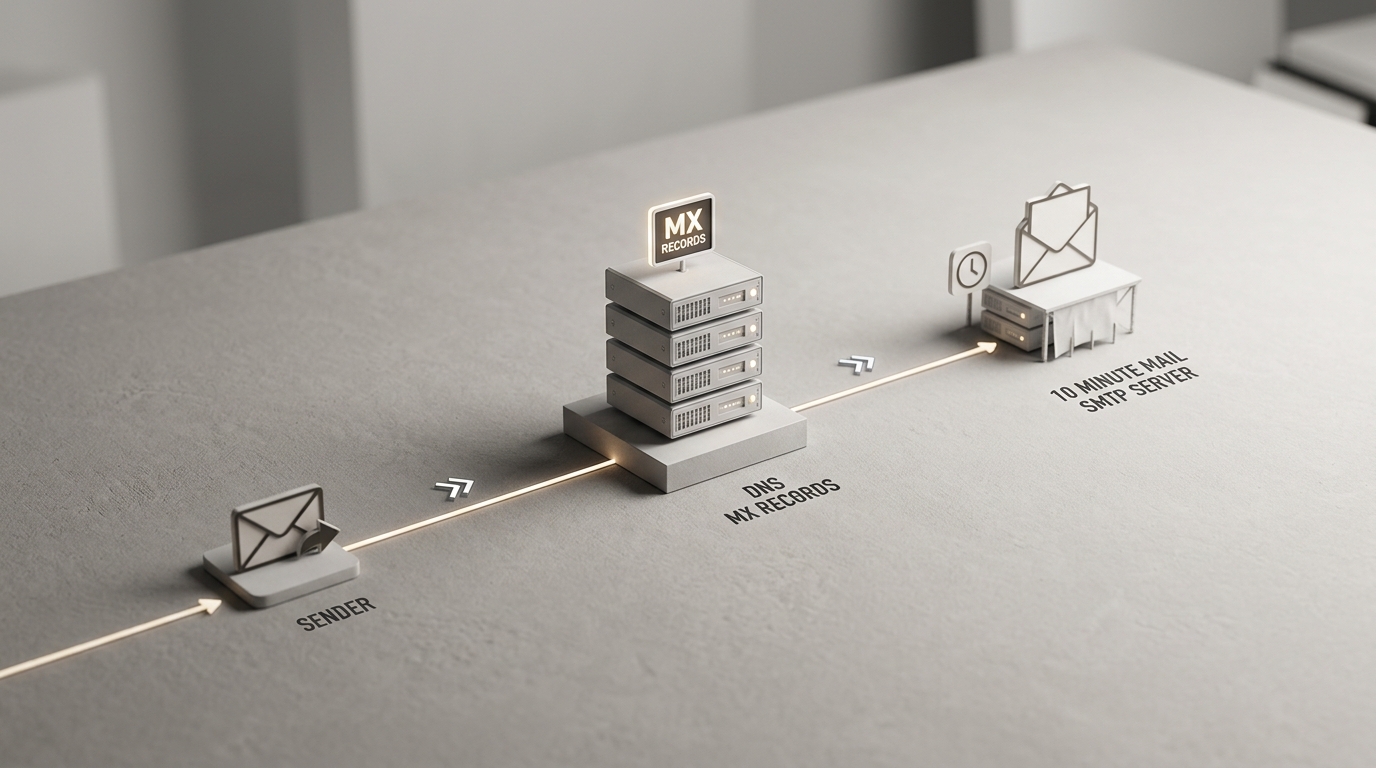
The MX record points to a custom SMTP server controlled by the temp mail provider. Without this pointer, the email would simply bounce as the domain wouldn't know how to handle mail traffic.
How to build it: Set up a DNS zone file with an MX priority of 10 pointing to your server's public IP address.
3. Catch-All SMTP Configuration
Standard mail servers like Gmail check if a recipient exists before accepting a message. Temporary mail services use a catch-all configuration that accepts every incoming message regardless of the prefix.
The server follows SMTP Protocol Standards to perform a handshake with the sender. It acknowledges the receipt of the mail even if the specific address was created only seconds ago.
The catch-all rule ensures zero delivery failures by telling the SMTP server to ignore user validation checks and accept everything.
How to build it: Configure a Postfix or custom Go-based SMTP server to pipe all incoming mail for the domain into a processing script.
4. Session Anchoring And Identification
Once the server accepts the email, it must decide which open browser tab should see it. This is achieved by anchoring the generated address to a specific user session.
Most services use encrypted browser cookies or unique session IDs to map the incoming mail to your current tab. This ensures your private verification code doesn't end up on someone else's screen.
Rule: Never use temporary addresses for accounts that require long-term access, such as banking or primary social media.
The session ID acts as the key that unlocks the specific portion of the server's memory where your mail is held.
How to build it: Use an HTTP-only cookie to store a session token that maps to the mailbox ID in your database.
5. Automated Message Parsing And Sanitization
Raw emails are messy and often dangerous. They contain tracking pixels, hidden scripts, and sometimes malicious attachments designed to de-anonymize you.
The service's backend immediately parses the incoming MIME data. It strips out HTML tags that could leak your IP address or trigger a 'read' notification for the sender.
Sanitization protects your privacy by neutralizing tracking links before the message ever reaches your browser. This process also reformats the text to ensure it looks clean in the web-based inbox interface.
How to build it: Integrate a library like DOMPurify or a custom regex parser to scrub all <script> and <img> tags from the email body.
6. Ephemeral Memory Storage (RAM/Redis)
Traditional email providers store your messages on hard disks for years. Temporary mail services do the opposite by utilizing volatile RAM or high-speed in-memory databases like Redis.
Storing data in RAM means that if the server loses power, the data is gone. This is a feature, not a bug, as it ensures there is no permanent forensic trail of your activity on physical storage media.

RAM-based storage offers superior speed and privacy for high-volume ephemeral data. A security researcher once found that sensitive password tokens on old hard drives are a major risk; ephemeral memory solves this by design.
How to build it: Use Redis with a key-value structure where the key is the email address and the value is the sanitized message content.
7. Real-Time WebSocket Updates
You don't have to refresh the page to see your mail. This real-time experience is powered by WebSockets, which maintain a constant open pipe between the server and your browser.
As soon as the SMTP server finishes parsing an incoming message, it pushes that data through the WebSocket directly to your screen. If the browser doesn't support WebSockets, the system usually falls back to AJAX polling.
Instant delivery is critical for time-sensitive OTPs where a thirty-second delay might cause the verification code to expire.
How to build it: Implement Socket.io or a similar library to emit a 'new_mail' event to the specific client ID when a message arrives.
8. Server-Side TTL Enforcement
The 10-minute limit is not just a cosmetic timer in your browser. It is a strictly enforced server-side constraint called Time-To-Live (TTL).
You cannot 'hack' the timer by stopping the JavaScript in your browser. The server tracks the exact millisecond the mailbox was created and will stop accepting mail for that address once the limit is reached.
Server-side enforcement prevents session manipulation and ensures the service can recycle resources efficiently. This hard limit is what keeps the system lean and prevents it from becoming a permanent storage provider.
How to build it: Set a Redis TTL on the mailbox key to 600 seconds, allowing the database to handle the deletion automatically.
9. Strategic Domain Rotation
Websites often maintain blocklists of known temporary email domains to force users into using real addresses. To combat this, providers frequently rotate their domains.
By switching to fresh, clean domains, these services stay one step ahead of automated filters. Platforms often fight back by maintaining lists of these ephemeral domains. If you are a developer looking to stop these registrations, you can use IsFakeMail to check incoming addresses against a database of over 187,000 domains.
Domain rotation ensures high success rates for users trying to sign up for services that have aggressive anti-spam measures.
How to build it: Maintain a pool of 5-10 active domains and rotate the default domain every few hours to distribute traffic.
10. The Final Data Purge
Once the clock hits zero, the final purge begins. The background job doesn't just hide the mail; it wipes the memory keys and terminates the session mapping.
Any mail sent to that address after the purge will be rejected by the SMTP server. The sender will receive a 'bounce' notification indicating that the recipient address no longer exists.
The purge is permanent and non-reversible to ensure that your data is never archived or sold. This is the core promise of the 'burn after reading' model.
How to build it: Run a cron job or background worker that identifies expired sessions and clears any associated file attachments from temporary directories.
10 Minute Mail vs. Traditional Email
Understanding the difference between permanent and ephemeral mail helps you choose the right tool for the task. Here is how the technologies stack up side-by-side.
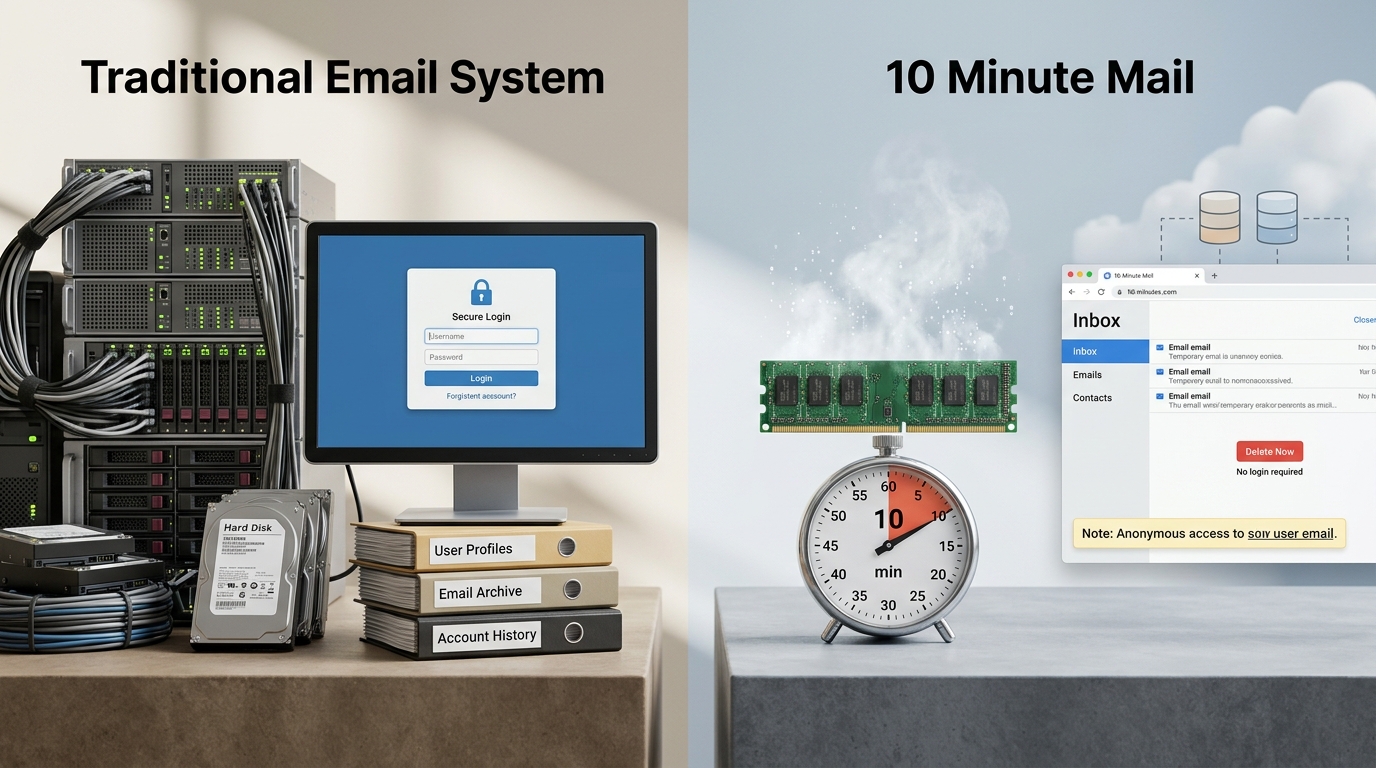
| Feature | Traditional Email (Gmail) | 10 Minute Mail Tech |
|---|---|---|
| 1. Address | User-defined, permanent | Algorithmic, random |
| 2. Routing | Global MX clusters | Targeted single-server MX |
| 3. Delivery | Specific user mailbox | Catch-all wildcard |
| 4. Sessions | Login/Password credentials | Anonymous session ID |
| 5. Security | Generic spam filters | Deep tracker stripping |
| 6. Storage | Persistent SSD/HDD | Volatile RAM (Redis) |
| 7. Updates | Periodic syncing | Real-time WebSockets |
| 8. Lifespan | Indefinite | Hard-coded TTL |
| 9. Domains | Stable (.com, .net) | Rotating/Fresh domains |
| 10. Deletion | User-initiated | Automated server purge |
Traditional email is built for persistence, while temporary mail is optimized for immediate, private utility.
Common Questions About Temporary Email Tech
Is temporary email safe to use?
It is safe for receiving verification codes and protecting your primary inbox from spam. However, because the address is public and short-lived, you should never use it for sensitive personal data or accounts you intend to keep long-term.
Can I send emails from a temporary address?
Most services, including the 10 Minute Mail Original Service, are receive-only. Allowing outgoing mail would turn the service into a platform for spam, which would get their servers blacklisted by ISPs almost immediately.
Why do some websites reject my temporary email?
Many companies use tools to identify and block disposable addresses to prevent users from abusing free trials or creating multiple fake accounts. They maintain databases of known temp-mail domains and update them in real-time.
What happens if I accidentally close the tab?
If the service uses cookies for session management, you can often recover the inbox by reopening the site within the 10-minute window. If the session cookie is cleared or the timer expires, the data is lost forever.
Is the data actually deleted?
Yes, reputable services store data in RAM and use automated server-side scripts to wipe the data. Once the TTL expires, the memory address is overwritten, making recovery impossible.
The Future Of Disposable Identities
Temporary email is a vital tool for maintaining privacy in an era of data harvesting. By understanding the SMTP handshakes and RAM storage that power these services, you can better protect your digital footprint.
- Use it for one-time verification codes.
- Use it when testing new software or apps.
- Avoid it for bank accounts or government services.
- Switch to standard mail for long-term communication.
That is it. You now have the technical blueprint of how these systems operate. Use this knowledge to keep your real inbox clean and your identity secure.