
How to Improve Your Email Sender Reputation by Removing Fake Domains
Your email sender reputation is the credit score of the digital world. If you're sending to fake domains or spam traps, your deliverability will tank. Here is the playbook to fixing it.
Your emails might be vanishing into a digital void without you ever knowing why. About 16 percent of emails globally never hit the inbox because of a hidden score you cannot ignore. If you want to improve email sender reputation, you have to look at the math that happens behind the scenes.
Hit just one clean spam trap and your ability to reach customers can drop by 50 percent overnight.
Your sender reputation is like a credit score for your domain. If you let fake domains and bad email addresses fill up your list, big providers like Gmail and Outlook will treat you like an outsider.
The Bottom Line Up Front
Fixing your domain health is a long game, not a quick fix. You can start the recovery process by focusing on these immediate steps:
- Audit your current score using Google Postmaster Tools
- Clean your list to remove typos and temporary domains
- Put real-time verification on all signup forms
- Verify your domain with SPF, DKIM, and DMARC
- Start a strict policy for removing inactive users
What Is Email Sender Reputation (And Why Is It Tanking?)
Email Sender Reputation is a grade given by Internet Service Providers (ISPs) to decide if they trust you. It is a score that changes based on how people react to your emails.
Positive actions like opens and clicks help your standing while bounces and complaints hurt it.
When you send mail to fake or broken domains, you get hard bounces. These signals tell providers that you are either using bad ways to get emails or, worse, sending spam to lists you bought.
83.1% Global average inbox placement rate
Step 1: Audit Your Current Reputation Status
You can't fix what you aren't tracking. Your first step is to get data from the companies that decide where your mail lands.
Google Postmaster Tools is the most important tool for seeing how Gmail looks at your domain and IP health.
I also suggest checking your Validity Sender Score to see a number for your reputation. This score goes from 0 to 100 and shows where you stand compared to other senders. Finally, use the Talos Intelligence IP/Domain Lookup to see if your setup has been flagged for any odd activity.
Step 2: Scrub Your Database Of Fake Domains And Traps
Email lists go bad at a rate of roughly 22.5 percent every year as people change jobs or close accounts. You have to delete these dead or risky entries to keep your reputation safe.
Typo traps like john@gmial.com are made by anti-spam groups to catch senders who don't clean their lists.
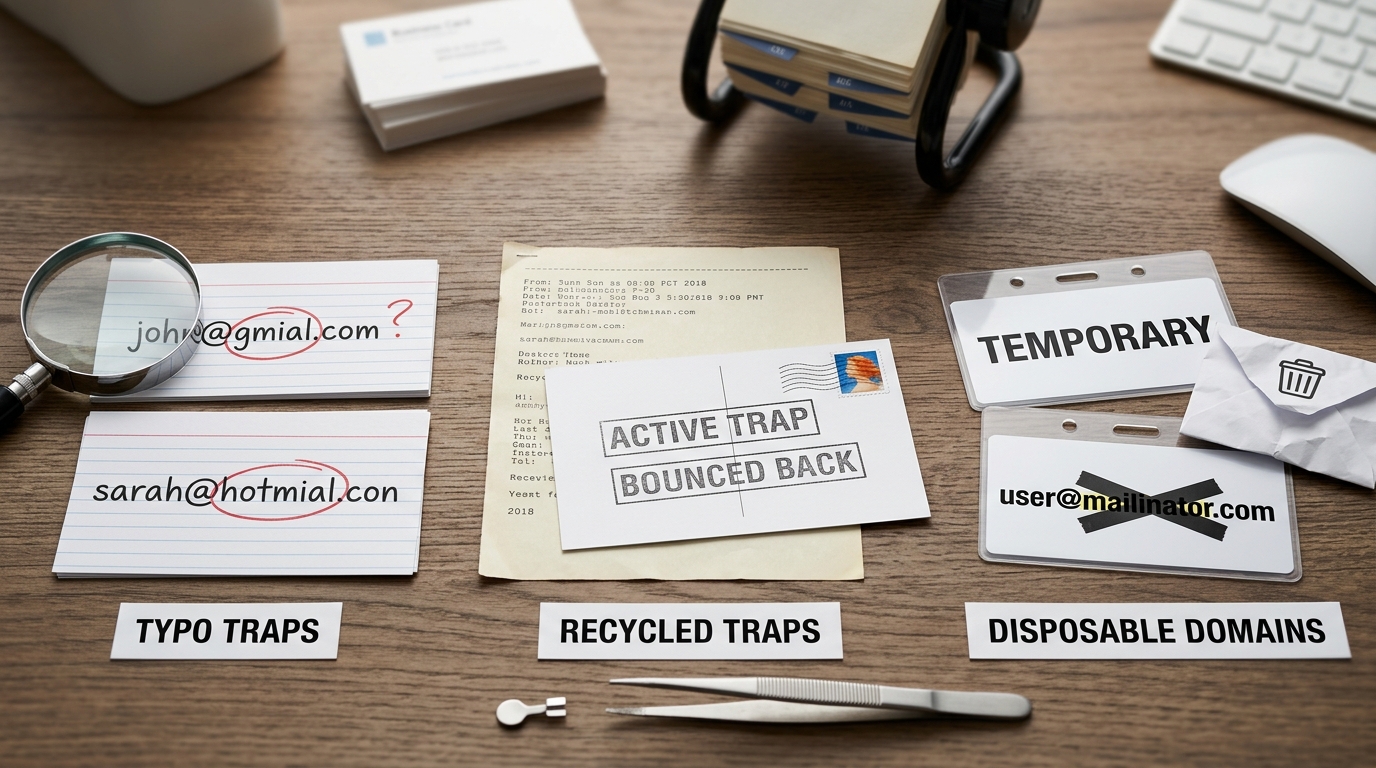
Think about a marketing manager at a retail brand. He sent a holiday email to an old list and hit several recycled spam traps. These are abandoned accounts that providers turned back on to catch bad senders. Gmail slowed his traffic down immediately, and his delivery rates dropped by half during the busiest shopping time of the year.
- Find and remove common typos like @gamil or @yahooo
- Look for Disposable Email Addresses (DEAs) used for one-time trials
- Use an SMTP check to see if a mailbox actually exists
- Delete accounts like admin@ or info@ that often lead to spam traps
Pitfall: Buying or scraping lists is the fastest way to hit a spam trap and ruin your domain reputation for good.
Step 3: Implement A Perimeter Defense On Sign-Up Forms
Cleaning your list one time isn't enough because new fake accounts show up every day. You need a gatekeeper at the start to keep the junk out of your database.
A real-time verification tool can find fake domains the second a user clicks submit.
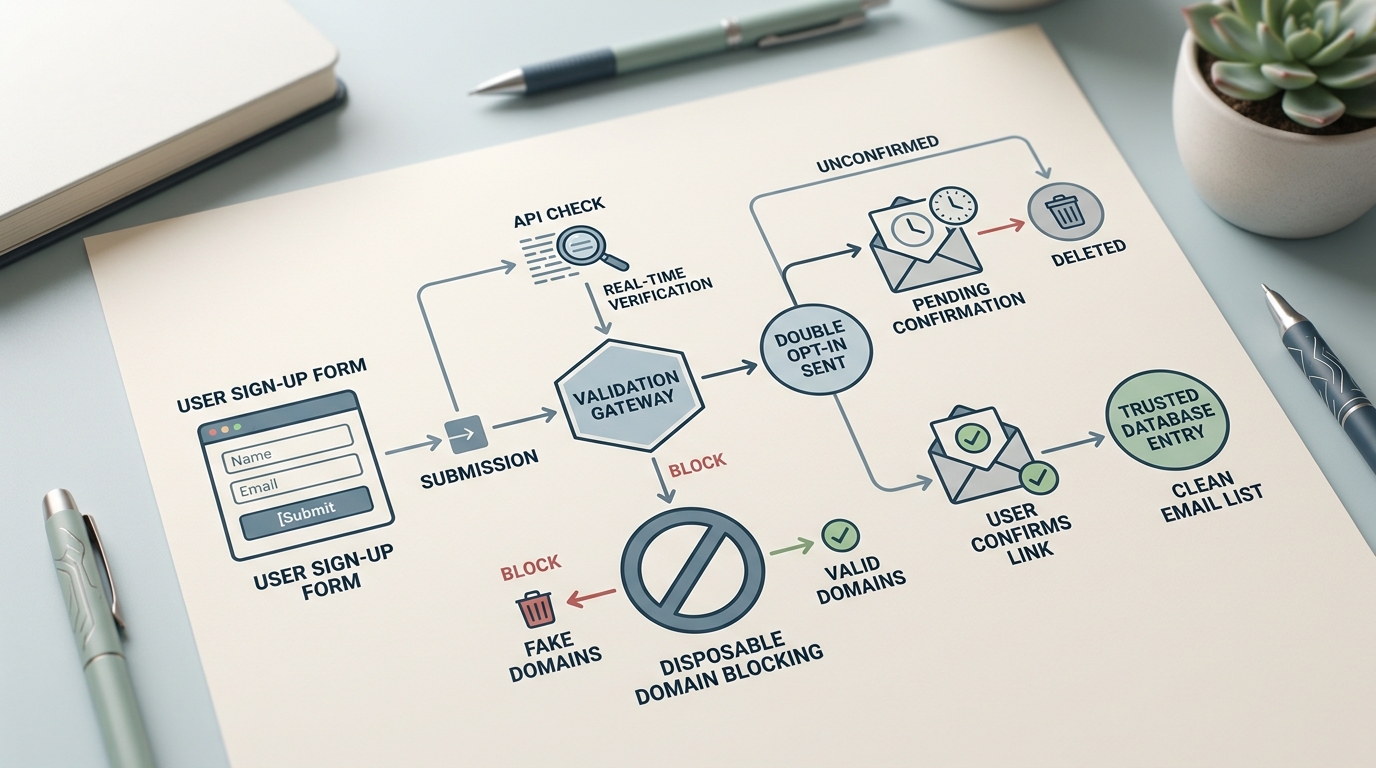
I suggest using a tool like IsFakeMail to automatically block temporary or burner email addresses. This free tool checks a database of over 187,000 domains to make sure your signups are real.
- If a user enters a known fake domain, ask them for a real email address.
- If the email format is wrong, stop the form from sending.
- If the signup is from a high-risk country where you don't do business, flag it for a manual look.
Step 4: Configure Your Technical 'ID Checks'
Authentication is like showing your ID to a provider. Without it, you are an unverified sender, and your mail is much more likely to go to the spam folder.
Your domain reputation follows you even if you change IP addresses, so your setup must be right.
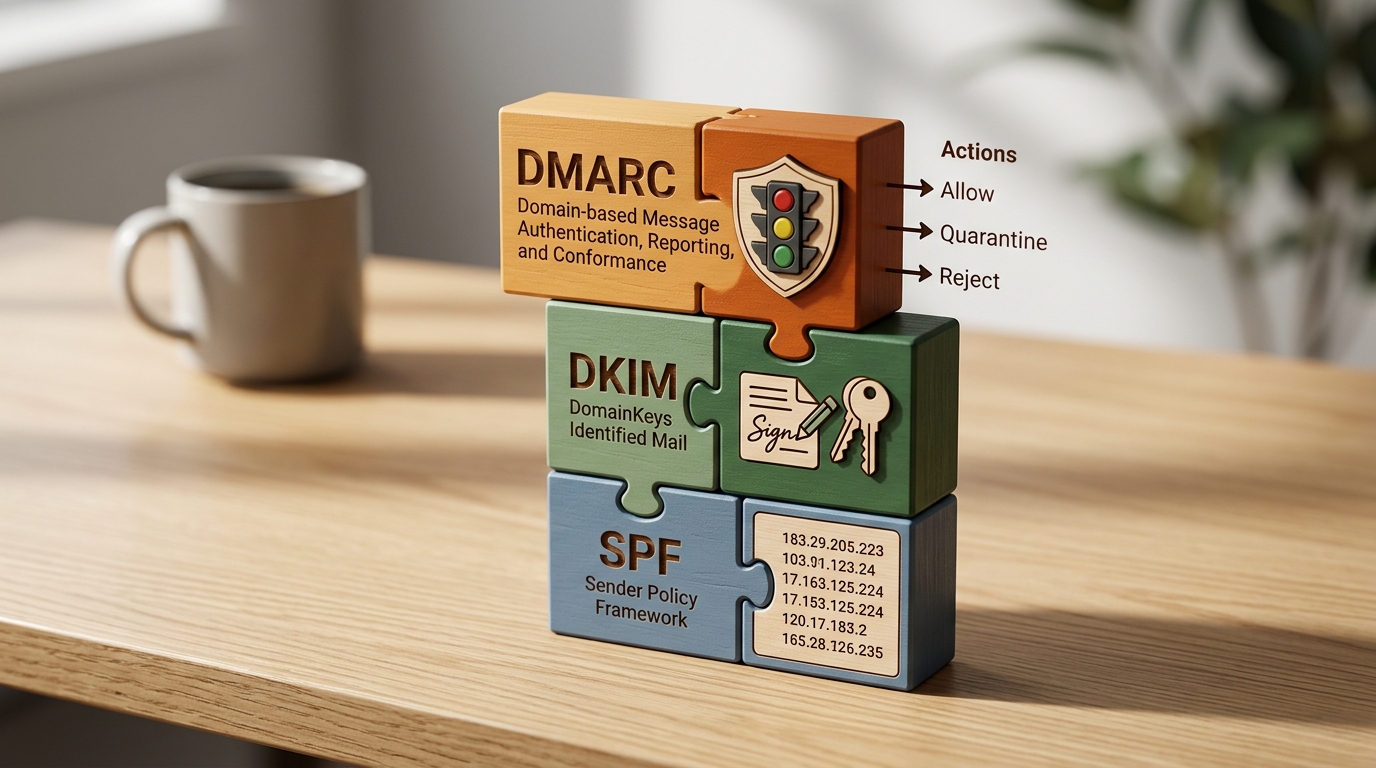
Start by setting up your Sender Policy Framework (SPF) to list every IP allowed to send mail for you. Then, add DomainKeys Identified Mail (DKIM) to put a digital signature on your emails. This proves the content hasn't been changed. Finally, check out DMARC.org to learn how to set a policy that tells providers to block any mail that fails these checks.
Step 5: Enforce A Sunset Policy For Low Engagement
Even real people can hurt your score if they stop opening your emails. Low open rates tell providers that your content isn't useful to your audience anymore.
Having a sunset policy makes sure you only send mail to people who actually want to read it.
I use a rule to automatically remove any subscriber who hasn't opened an email in 6 to 12 months. This keeps your engagement numbers high and lowers the risk of hitting a spam trap from an old account.
Rule: Keep your spam complaint rate below 0.1 percent to stay on the good side of the big email providers.
Top Tools For Reputation Management
Selecting the right tools can simplify the process of monitoring and maintaining your sender health. Here is a breakdown of the top resources available.
| Tool | Best For | Price |
|---|---|---|
| Google Postmaster Tools | Gmail-specific reputation and delivery data | Free |
| IsFakeMail | Real-time disposable and fake domain detection | Free |
| Validity Sender Score | Numerical benchmarking of your domain health | Free/Paid |
| Talos Intelligence | Checking global blacklists and IP reputation | Free |
Frequently Asked Questions
How long does it take to repair a damaged reputation?
It usually takes 4 to 8 weeks of sending clean mail to see a real change. Providers need time to see your new habits before they update their filters.
Can I just switch to a new domain to start fresh?
This rarely works because providers look for patterns in your sending and content. Your bad reputation will likely follow you, and the new domain might get blocked right away.
Is double opt-in really necessary for reputation?
It is one of the best ways to keep your list clean. By making people click a link to confirm their address, you stop fake domains and typos before they ever get on your list.
Take Control Of Your Deliverability
Fixing your email sender reputation takes discipline and getting the technical parts right. By getting rid of fake domains and checking new signups in real time, you stop the damage and start building trust with providers again.
Clean lists are the secret to getting results from email marketing. Start by checking your status today and clearing out the bad domains that are holding you back.