
How to Block Disposable Email Signups: The Definitive Developer Handbook
Disposable emails can destroy your SaaS deliverability and inflate your cloud costs. This playbook covers the 2026 standard for layered defense: combining static blocklists with sub-second API validation.
Your signup counts aren't telling the whole truth. By 2026, about 30% of signups on busy freemium sites will likely be fake inboxes that disappear in minutes. Knowing how to block disposable email signups isn't just a nice perk for lead quality; it's a vital way to protect your business infrastructure.
These ghost accounts do more than just mess up your data. They can actually kill your sender reputation. Gmail and Yahoo now watch for a 0.3% bounce rate on incoming mail. If you go over that limit, your real transactional emails will likely end up in the spam folder.
TL;DR: The 2026 Email Security Standard
- Use a layered defense with local lists first, then real-time API checks.
- Clean up Gmail and Outlook addresses so people cannot use dots or plus tags to make multiple accounts.
- Stop these signups early at the frontend to save on database costs.
- Check your hard bounce rates every week to stay under that 0.3% danger zone.
Get started with the open-source community data at the Disposable Email Domains Blocklist (GitHub).
Step 1: Implementing A Local Cache Defense
Static blocklists are your first line of defense. They allow you to reject thousands of common burner domains without incurring API costs or adding latency to your signup flow.
There are over 110,646 unique domains currently tracked by the developer community. You should fetch these lists daily and store them in a fast local cache like Redis or an in-memory object.
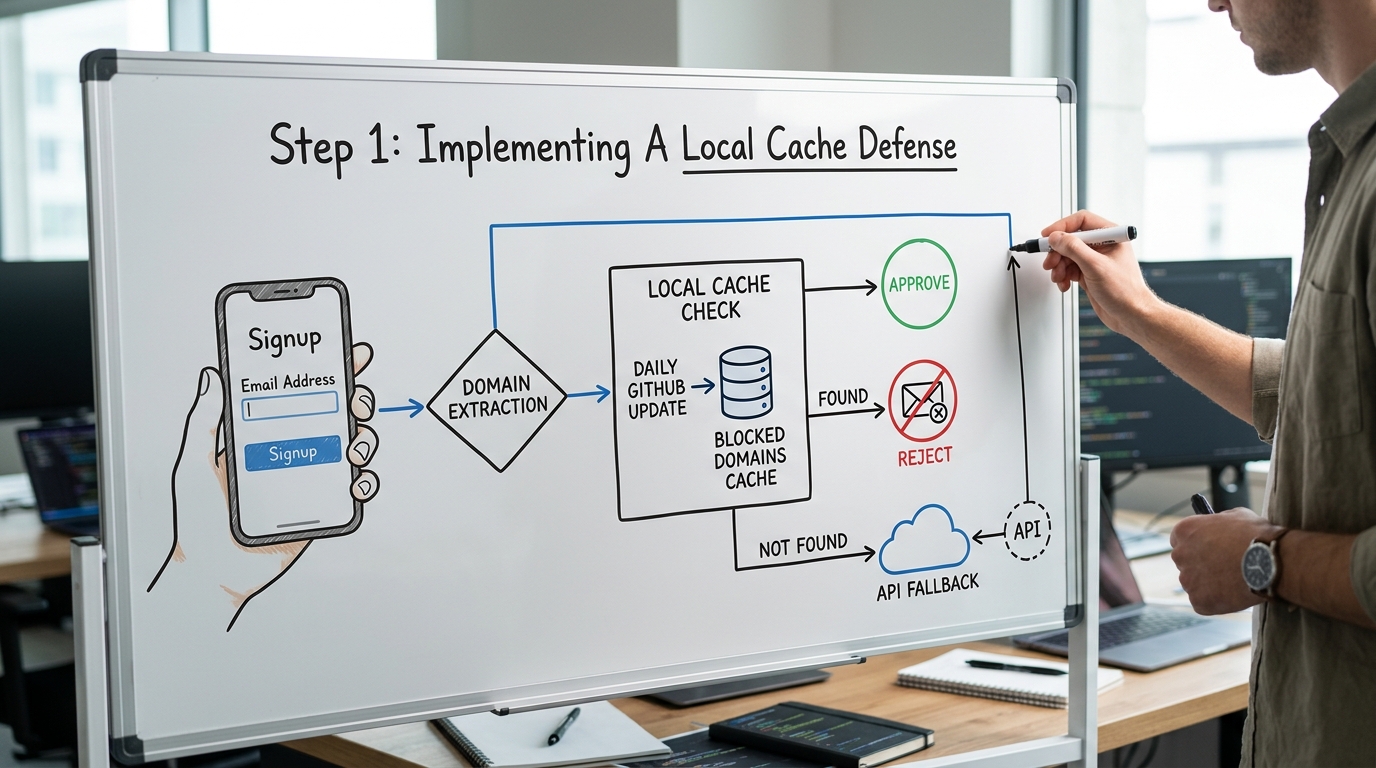
Before you run any database logic, extract the domain from the user input. This simple string operation saves you from processing a registration that is doomed to bounce.
// domain_check.js
const getDomain = (email) => {
  const parts = email.split('@');
  return parts.length === 2 ? parts[1].toLowerCase() : null;
};

const isBlocked = (domain, blocklist) => {
  return blocklist.has(domain);
};

// Example usage
const userEmail = "test@mailinator.com";
const domain = getDomain(userEmail);
if (isBlocked(domain, localCache)) {
  return { error: "Please use a permanent email address" };
}
Rule: Always perform domain extraction on the server side to prevent users from bypassing client-side validation logic.
High-traffic sites often see hundreds of burner attempts per hour. One developer at a scaling SaaS startup found that blocking Mailinator alone reduced their database growth by 12% in a single month without affecting real conversions.
Step 2: Integrating Real-Time API Validation
Static lists are like a game of whack-a-mole. New burner sites pop up every day. To catch the newest premium domains, you need a real-time API check for domains that are not in your local cache yet.
Here is a walkthrough that covers the key steps for integrating these checks:
Services like IsFakeMail offer a free REST API that flags temporary addresses from a database of over 187,000 domains. This helps you catch the smarter services that hide from basic GitHub lists.
You can also check out UserCheck or AbstractAPI if you have a lot of traffic. Make sure your setup times out fast so you don't ruin the user experience if the service lags.
200ms The longest you should wait for a signup validation API.
- Set a quick timeout for every external API call.
- Let the user through if the API is down so you don't block real customers.
- Save API results for 24 hours to avoid asking about the same domain twice.
Note: If you don't recognize a domain and it isn't from a big name like Gmail or Outlook, be careful. You might want to require a magic link for those users.
Step 3: Handling Normalization And Aliases
Blocking the domain is only half the battle. Users often use legitimate providers like Gmail but exploit plus-addressing and dots to create infinite accounts from one inbox.
Gmail ignores dots in the username, so j.o.h.n@gmail.com is the same as john@gmail.com. If you do not normalize these, one user can exhaust your free trial resources easily.

Example
- Raw Input:
user.name+marketing@gmail.com - Normalized:
username@gmail.com - Action: Use the normalized version for uniqueness checks while keeping the raw version for delivery.
// normalize.js
const normalizeGmail = (email) => {
  const [local, domain] = email.toLowerCase().split('@');
  if (domain !== 'gmail.com') return email;

  // Remove everything after '+' and all '.'
  const cleanLocal = local.split('+')[0].replace(/\./g, '');
  return `${cleanLocal}@${domain}`;
};
Pitfall: Never block addresses with plus-signs entirely. Many power users use them for organization and will be frustrated if you reject their valid email.
To prevent automated scripts from cycling through burner accounts, implement IP-based rate limiting. Using a tool like Upstash to limit signups to 2 per week per IP address adds a significant barrier for bad actors.
Detection Strategy Comparison: Static vs. API
Choosing a strategy depends on your traffic and risk profile. Most professional setups use a hybrid of all three methods to ensure maximum deliverability and zero database pollution.

| Method | Cost | Accuracy | UX Latency |
|---|---|---|---|
| Static Lists | Free | Medium | Near Zero |
| Real-time API | Free to Paid | High | < 200ms |
| DNS/MX Check | Free (Dev time) | Low | High (seconds) |
- If you have fewer than 1,000 signups per month, a static GitHub list is usually sufficient.
- If you run a high-value SaaS trial, a real-time API is necessary to prevent revenue loss from serial trial-abusers.
- If the user uses a custom domain, perform an MX check to ensure the domain is actually configured to receive mail.
- If you detect an alias on a major provider, normalize the string instead of blocking the user.
Common Offenders: Providers To Watch
There are thousands of these sites, but a few names show up more than others. Learning how they work helps you tweak your filters to stop the biggest threats.
- Mailinator: This is the classic public inbox. It is usually the first domain added to any blocklist.
- Temp-Mail.org: This one is trickier. It uses new premium domains to get past static lists.
- 10MinuteMail: These addresses disappear after a few minutes. They are perfect for people trying to bypass a quick verification.
- Guerrilla Mail: It has many subdomains and lets users send mail, which people often use to spam others.
- YOPmail: Bot nets use this for bulk accounts because the addresses last longer than the 10-minute versions.
Each of these sites is a different kind of headache. Mailinator is easy to stop with a simple list, but Temp-Mail needs active API checks to stay current. Guerrilla Mail uses so many subdomains that simple matching doesn't always work without a massive database.
Frequently Asked Questions
Will blocking these emails increase my false positive rate?
The risk is very low if you only block known junk domains and allow the big providers. Just use a clear error message so a real person with a rare domain can get help if they need it.
Is it better to block signups or just flag them?
Blocking is better for your servers. Flagging lets the user into your system where they can still use up your storage and API credits before you eventually kick them out.
Do I need an API key for IsFakeMail?
No. The IsFakeMail API is free and doesn't need a login. It's very easy to add to a quick script or edge function.
How often should I update my local blocklist?
Burner domains change every day. You should set up a script to pull the latest lists at least once every 24 hours.
Does blocking DEAs affect my SEO?
No. Email checks happen behind a signup wall. Search engines don't see this, so it won't change your rankings.
Securing Your Signup Pipeline
Protecting your signups is a constant job. As burner services get better at hiding, your checks have to rely more on real-time data and strict cleaning.
One bad week of bot signups can ruin your sender reputation for a long time. Recovering from a blacklisted domain is a slow, expensive process. Most startups simply can't afford to fix that kind of damage.
A layered defense - using community lists along with a fast API - is the only way to manage over 110,000 bad domains. Set these checks up today to make sure your database only has real, reachable people in it. Start by cleaning your current list and moving your blocking logic as close to the user as you can.