
Email List Hygiene: 11 Best Practices for 100% Deliverability in 2026
Email list decay is faster than ever in 2026. This guide breaks down the 11 essential hygiene practices to keep your sender reputation pristine and your ROI high.
About 16% of marketing emails never make it to the inbox due to poor list quality. That is a massive hole in your budget that loses you money every single day.
Your list is dying faster than you think. Between people switching jobs and ditching old accounts, annual list decay is now hitting 30% based on recent reports. Cleaning is a deep scrub you do once a year, but following email list hygiene best practices is the daily habit that keeps you out of trouble. Without it, you are just messaging ghost accounts that drag your reputation into the dirt.
Sending to inactive users tells filters that your content is boring. Once you hit the spam folder, fixing your sender reputation takes months of hard work and lost sales.
The 2026 Hygiene Cheat Sheet
- Set up a sunset process to cut users who have not opened an email in 180 days.
- Use validation at the entry point to block bad data before it hits your CRM.
- Focus on engagement rather than list size because high-quality clicks are the only thing Gmail cares about.
- Process unsubscribe requests within 48 hours to stay compliant with 2026 bulk sender rules.
Why Email Hygiene Is No Longer Optional in 2026
The tech world has changed a lot. In 2026, the primary inbox is guarded by a 0.1% spam complaint limit that leaves no room for mistakes.
If more than one out of a thousand people marks you as spam, Google and Yahoo will start blocking your traffic. This shift makes strict hygiene a survival tactic rather than just a chore. Companies that keep clean lists see a 50% to 75% jump in open rates and ROI. A 5,000-person list of fans will always beat a 50,000-person list of ghost accounts.
As noted in the ZeroBounce Email List Decay Report, the cost of ignoring list quality is the slow death of your deliverability. High standards make sure your setup stays healthy for years.
1. Implement Double Opt-in (DOI) as the Baseline
The Strategy Double opt-in makes sure every person on your list actually wants to be there. It requires a second click to join. This is the best way to stop bot signups and typos at the start.
Implementation
- Send a check-in email right after the user signs up.
- Use a clear button that says "Confirm My Subscription."
- Do not add the user to your main marketing emails until the click is recorded.
Rule: Never add users to a paid list without a verified double opt-in.
2. Deploy Real-Time API Validation at Signup
The Strategy Real-time checks stop bad addresses from entering your database. This prevents 95% of bad data from ever touching your sender reputation.
Implementation You can use a tool like IsFakeMail to find and block fake email domains during signup. This free API helps you keep a clean database without any manual work.
- Link an API like Kickbox or Bouncer directly to your signup forms.
- Show an error message if the user enters a typo or a temporary address.
- Block burner email addresses right away to keep your list quality high from day one.
3. Enforce an Automated Sunset Policy
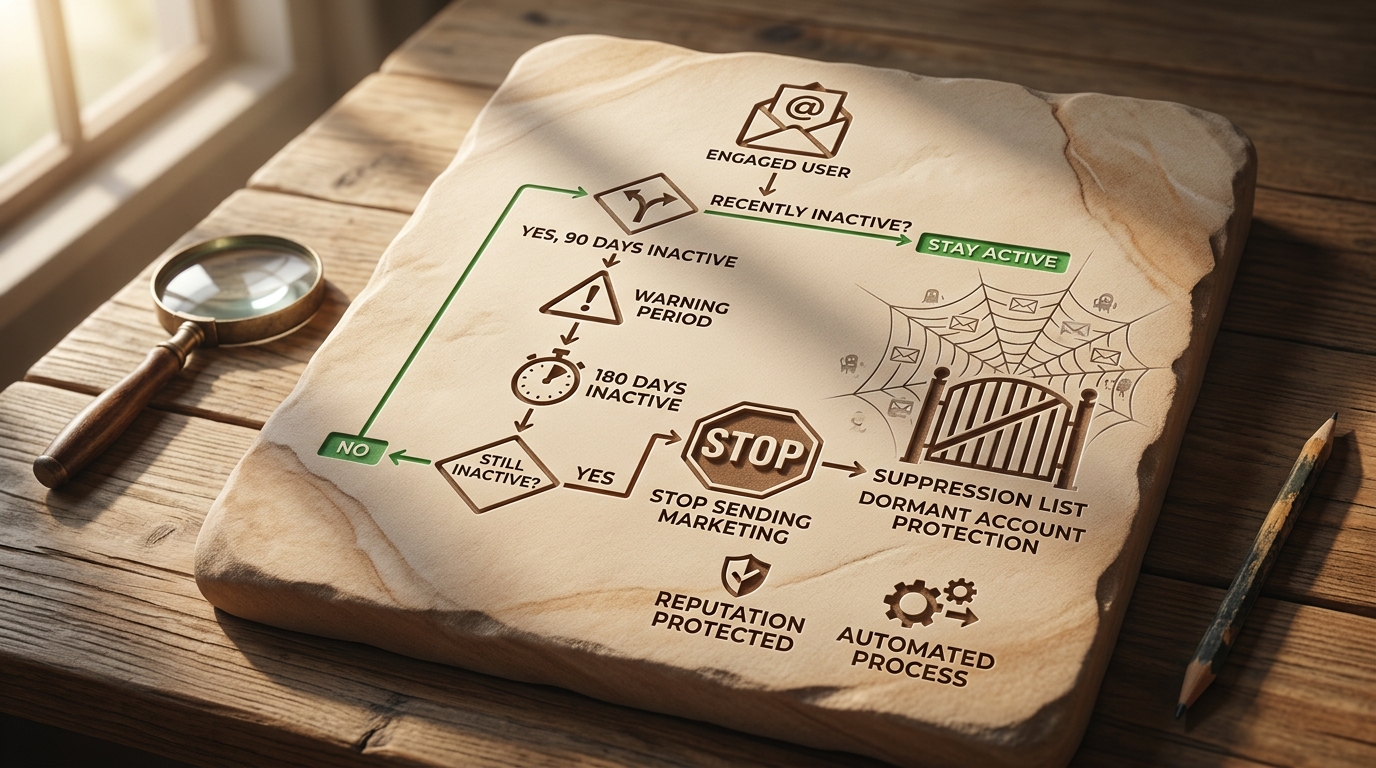
The Strategy A sunset policy removes users who have stopped looking at your content. This protects your domain reputation from old accounts that often turn into spam traps.
Implementation
- Tag users who have not opened or clicked an email in 90 days as "fading."
- If they reach 180 days of inactivity, automatically move them to a suppression list.
- Stop all regular marketing emails to these accounts to keep your stats healthy.
Think about a marketing manager who ignores a sunset policy for a year. They might see open rates crash from 30% to 12% because Gmail sees the list as "low interest." This leads to a permanent spot in the promotions tab or the spam folder.
4. Verify One-Click Unsubscribe Header Compliance
The Strategy A one-click unsubscribe header is now a rule for Google and Yahoo bulk senders. It is better to let a user leave easily than to force them to hit the spam button.
Implementation
- Make sure your email provider supports the "List-Unsubscribe" header in the code.
- You must honor every unsubscribe request within 48 hours to stay compliant.
- Keep the link easy to find to maintain trust with your audience.
5. Automate Hard Bounce Suppression
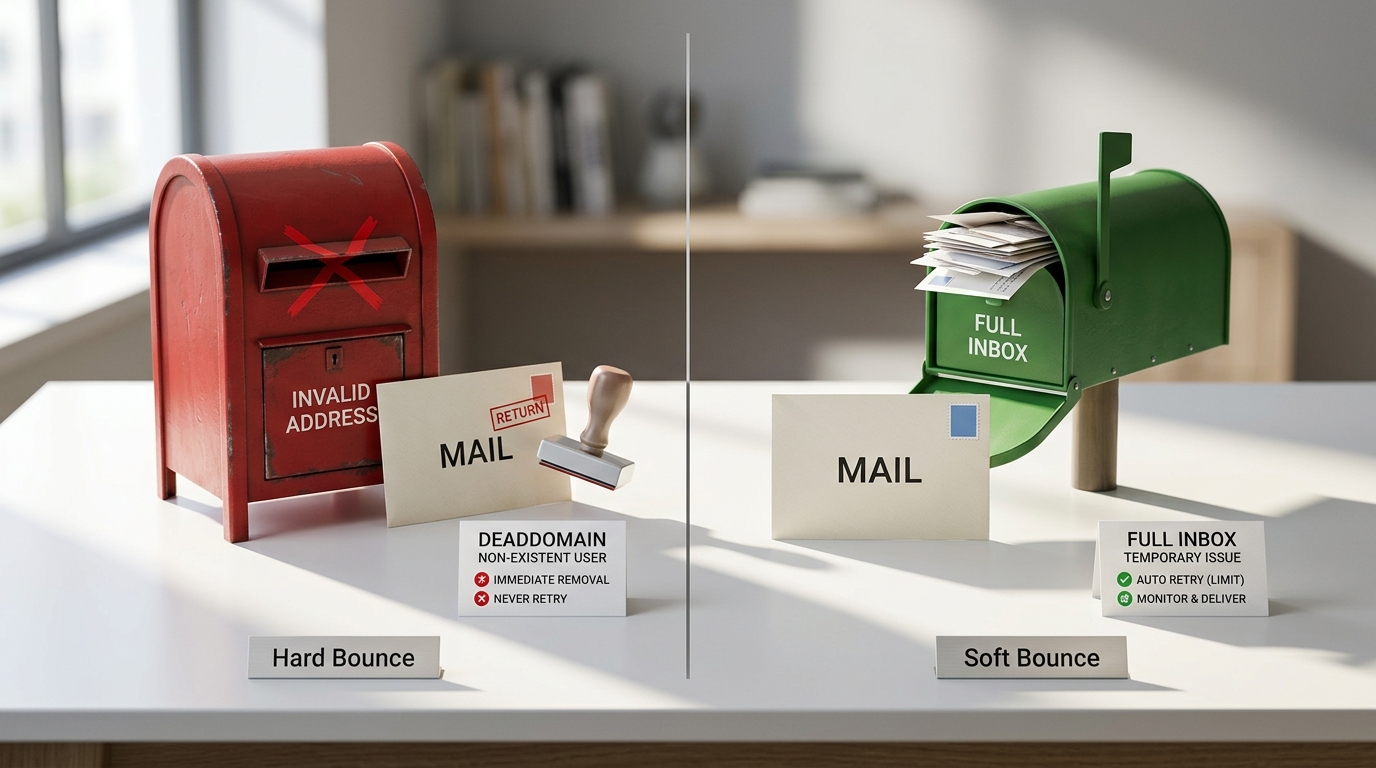
The Strategy Hard bounces happen when an email is permanently gone, like a deleted account. You must remove these addresses after the first failure every time.
Implementation
- Set your ESP to automatically block any address that returns a hard bounce.
- Learn the difference between soft bounces, like a full inbox, and hard bounces, which are dead domains.
- Never try to resend to a hard bounce. It tells providers that you are a low-quality sender.
6. Align SPF, DKIM, and DMARC Authentication
The Strategy Authentication alignment is a hard requirement for primary inbox placement in 2026. Without SPF, DKIM, and DMARC, your emails will likely be rejected by major providers.
Implementation
- Set your DMARC policy to at least 'none' to monitor traffic, then move to 'quarantine'.
- Use tools like MXToolbox to verify your records are configured correctly.
- Ensure your 'From' domain matches the domain in your authentication records.
# Example DMARC TXT record for your DNS
_dmarc.yourdomain.com  IN  TXT "v=DMARC1; p=quarantine; rua=mailto:dmarc-reports@yourdomain.com;"
7. Run Multi-Step Re-engagement Campaigns
The Strategy A re-engagement campaign is the last chance to save a fading subscriber. This series tries to bring back interest with a special offer or by asking what they want to see.
Implementation
- Start a 2 to 4 email series for users who have been quiet for 90 days.
- Offer a one-time discount or ask them to update their preferences.
- If they do not click the final email, move them to the suppression list.
Example
Subject: Should we say goodbye? Body: We noticed you haven't opened our emails lately. If you still want to hear from us, click below to stay on the list. Otherwise, we will remove you in 48 hours to keep your inbox clean.
8. Filter Role-Based Addresses
The Strategy Role-based addresses like admin@ or info@ often lead to high spam complaints. These are usually shared by teams, so real consent is hard to prove.
Implementation
- Use a tool like IsFakeMail to flag these generic addresses during your audit.
- Think about asking for more engagement from these contacts to keep them.
- Avoid sending too many marketing blasts to these shared inboxes to lower your risk.
9. Utilize Engagement-Based Frequency Segmentation
The Strategy Not every subscriber wants to hear from you every day. Sending less often to people who don't engage stops them from reporting you as spam and keeps you in the inbox.
Implementation
- Create a "High Engagement" group for users who open your emails weekly.
- Move "Low Engagement" users to a monthly update instead of a daily blast.
- Adjust your timing based on the last interaction date to stay helpful without being annoying.
10. Conduct Regular Quarterly Bulk Scrubbing
The Strategy Automated tools are great, but you still need a manual safety net. Running a full list check every three months catches dying domains that have not bounced yet.
Implementation
- Export your database and run it through a scrubber like NeverBounce.
- This finds accounts that recently became "catch-all" or invalid.
- Data from the Mailgun State of Email Deliverability shows that consistent scrubbing is what top senders do.
11. Monitor Spam Complaint Thresholds Closely
The Strategy Your spam complaint rate is the most important stat for sender health. You must keep complaints below 0.1% to stay in the primary inbox.
Implementation
- Check your reputation daily using Google Postmaster Tools.
- If your complaint rate hits 0.3%, stop sending and find the problem.
- High complaints usually mean your content is off or your unsubscribe link is too hard to find.
Summary of Hygiene Tools & Benchmarks
| Category | Recommended Tool | Core Benchmark |
|---|---|---|
| Real-time Validation | IsFakeMail | 0% Disposable Rate |
| High-Volume Scrubbing | NeverBounce | < 0.5% Bounce Rate |
| Reputation Monitoring | Google Postmaster | < 0.1% Spam Rate |
| Authentication | MXToolbox | 100% SPF/DKIM Match |
| Inbox Placement | ZeroBounce | > 90% IPR |
How to Measure Your Hygiene Success
- Make sure your bounce rates stay below 0.5% after every cleanup.
- Check that at least 90% of your emails reach the inbox using seed lists.
- Watch your domain and IP reputation in Google Postmaster Tools for any drops.
- Audit your forms to see if validation APIs are blocking bad data in real-time.
- Confirm that one-click unsubscribe headers are working in every marketing message.

High Hygiene, Higher ROI
Email hygiene is not a chore you do once a year. It is a smart investment in your marketing that turns dead data into real money.
A leaner list means lower costs, better stats, and a solid reputation. When your emails actually reach the people who want them, your ROI will take care of itself. Start by fixing your signup validation and sunset rules today.
Email Hygiene Frequently Asked Questions
How often should I clean my email list?
You should have automated hygiene running every day for new signups. For the whole database, a manual scrub every 90 days is the standard to catch old domains.
Does cleaning my list reduce my reach?
Technically yes, but only the fake reach that was hurting your reputation. Removing inactive users actually helps you reach real subscribers by keeping you out of the spam folder.
Is double opt-in really necessary in 2026?
Yes, it is the best way to prove consent and block bots. Most big senders now use it as a basic rule for keeping a healthy reputation.
Can I use Google Postmaster Tools for free?
Yes, Google Postmaster Tools is a free resource from Google. It helps you track your reputation and spam complaints. It is a must for any serious email marketer.