
Blocking Temporary Email Addresses in Node.js and Express Applications
Temporary email addresses are the silent killer of SaaS trial metrics. This guide shows you how to implement a robust, real-time blocking system in Node.js to protect your application from burner accounts.
Syntax validation is a relic of a simpler internet that no longer exists in 2026. If you are only checking for an @ symbol and a valid TLD, you are leaving your database doors wide open for automated abuse. Temporary email services like 10-minute mail allow bots to bypass registration hurdles instantly without providing a real identity.
This is not just a data hygiene issue; it is a financial one. Campaigns sent to lists riddled with disposable addresses suffer from 15% bounce rates, which eventually destroys your sender reputation with ESPs. Your marketing analytics become a hall of mirrors where user growth looks impressive while actual engagement is non-existent.
You need a system that identifies these burner domains before they ever hit your database. This playbook shows you how to integrate real-time detection into your Node.js backend using Express middleware and a fail-open architecture.
At A Glance: Blocking Burner Emails
Stopping disposable signups requires a multi-layered approach that balances security with user experience. Follow these core principles to harden your registration flow:
- Move beyond simple Regex and implement real-time domain lookups to catch newly registered burner services.
- Use a fail-open strategy to ensure legitimate users can sign up even if your validation service experiences a timeout.
- Normalize email addresses to prevent the same user from registering multiple times with Gmail dot or plus variations.
- Verify domain reputation during the request cycle to stop bot-driven account creation before it consumes server resources.
Why Static Blacklists are Failing in 2026
The landscape of disposable email services moves faster than any static list can keep up with. These services rotate domains daily specifically to evade the blacklists found in older NPM packages and GitHub repositories. Relying on a static file means you are essentially fighting the last war while new burner domains are generated in real-time.
Modern attackers even use legitimate Gmail domains to mask their temporary nature, making traditional domain-level blocking ineffective against high-end spoofing. A developer recently noted on Reddit that static blocklists are dead because any service that only maintains a known list is inherently reactive rather than proactive.
187,393+ disposable domains currently tracked by modern detection APIs.
You can still find community-maintained resources like the GitHub Disposable Domains List. However, these should serve as a secondary fallback rather than your primary line of defense. For production environments, you need a dynamic solution that queries live data to ensure your filters are current as of this second.
Comparing Detection Methodologies
Different verification methods offer varying levels of protection and performance impact. Choosing the right one depends on whether you prioritize raw speed or absolute certainty about a mailbox's existence.

| Method | Latency | Accuracy | Best For |
|---|---|---|---|
| Static Blacklist | <5ms | Low | Legacy apps with low abuse rates |
| DNS/MX Check | 100-300ms | Medium | Basic domain validity verification |
| SMTP Pinging | 1s - 5s | High | High-value lead qualification |
| Real-Time API | <50ms | Very High | Modern SaaS registration flows |
Real-time APIs provide the best balance by combining database checks with active domain monitoring. Response times under 50ms are the gold standard for maintaining a smooth user experience while preventing fraudulent signups.
Implementation: Building the Express Middleware
Building a custom middleware allows you to intercept every registration request and validate the email address before any business logic executes. This keeps your routes clean and ensures that your user creation functions only deal with legitimate data.
Consider the case of a startup founder like Alex who launched a free tier for their AI tool. Within hours, bot accounts using burner emails consumed $400 in API credits by cycling through thousands of temporary mailboxes. By implementing a middleware check, Alex could have stopped the financial bleed at the front door.
Step 1: Initialize the Project
First, install the necessary dependencies to handle HTTP requests and environment variables. You will need axios for API calls and dotenv to keep your credentials secure.
npm install express axios dotenv express-validator
Step 2: Configure Environment Variables
Create a .env file in your root directory. This prevents you from hardcoding sensitive information into your source code.
# .env
PORT=3000
VALIDATION_API_KEY=your_key_here
Step 3: Write the Middleware
Create a dedicated file for your validation logic. The middleware will extract the email from req.body, split it to find the domain, and query a validation service.

// middleware/emailValidator.js
import axios from 'axios';

export const blockTemporaryEmails = async (req, res, next) => {
  const { email } = req.body;
  if (!email) return res.status(400).json({ error: 'Email is required' });

  try {
    // Normalize: remove dots and ignore everything after + in Gmail
    const [local, domain] = email.toLowerCase().trim().split('@');

    // Example check using IsFakeMail API
    const response = await axios.get(`https://isfakemail.com/api/check/${domain}`, {
      timeout: 3000 // 3 second timeout for fail-open
    });

    if (response.data.disposable) {
      return res.status(400).json({
        error: 'Registration failed. Please use a permanent email address.'
      });
    }

    next();
  } catch (error) {
    // Fail-open: if the API is down, allow the user through
    console.error('Email validation service error:', error.message);
    next();
  }
};
Step 4: Apply to Routes
Finally, import your middleware and add it to your POST routes. This ensures that only validated requests proceed to your user creation logic.
// app.js
import express from 'express';
import { blockTemporaryEmails } from './middleware/emailValidator.js';

const app = express();
app.use(express.json());

app.post('/register', blockTemporaryEmails, (req, res) => {
  res.status(201).json({ message: 'User registered successfully' });
});
Tip: Always normalize the email address by converting it to lowercase before checking. This prevents attackers from bypassing your filters with simple capitalization tricks like User@Example.com.
The 'Fail-Open' Strategy: Protecting User Experience
A validation system that blocks legitimate signups because an external service is down is worse than having no system at all. You must design your middleware to prioritize user experience over absolute enforcement when technical issues arise.
Implementing a strict timeout of 3 seconds ensures that your registration page never hangs. If the validation API does not respond within this window, the system should log the error and allow the user to proceed anyway.
- If the API confirms the email is disposable, then reject the registration immediately.
- If the API returns a 5xx error or times out, then permit the user to sign up and flag the account for later review.
- If the domain is a known high-traffic provider like Gmail or Outlook, then bypass the API check entirely to save costs.
- If you are running a high-traffic application, then use a local Redis cache to store domain results for 24 hours.
Rule: Never let a third-party dependency be a single point of failure for your revenue-generating signups.
Top 5 Node.js Tools for Email Validation
There are several tools available in the Node.js ecosystem that help automate the detection process. Each offers a different balance of depth, speed, and ease of integration depending on your specific needs.
- IsFakeMail API This service provides a lightning-fast REST API designed specifically for real-time detection. It tracks over 187,000 domains and responds in under 50ms, making it ideal for high-traffic registration flows. The main tradeoff is the dependency on an external network call, though its speed minimizes this impact. Setup: You can query the IsFakeMail API using a standard GET request to their public endpoint without complex authentication.
- deep-email-validator
This NPM library goes beyond domain lists by performing regex, typo detection, DNS lookups, and SMTP pings. It is highly thorough and does not rely on a single third-party provider. However, the SMTP check can be slow and may result in your IP being flagged by some mail servers.
Setup: Install via npm and use the
validatefunction. Check the deep-email-validator on NPM for documentation. - MailChecker
A cross-language library that focuses purely on identifying throwaway domains using a large, curated list. It is extremely fast because it runs locally with no network overhead. The tradeoff is that you must frequently update the package to get the latest domain definitions.
Setup: Import the library and pass the email to
MailChecker.isValid(email)for an instant boolean response. - disposable-email-domains-js
This is a simple wrapper for frequently updated GitHub domain lists. It is perfect for developers who want a lightweight, local solution without the complexity of SMTP checks. The downside is its reactive nature; it cannot catch brand-new domains registered today.
Setup: Periodically run
npm updateto pull in the latest domain lists from the community-maintained source. - express-validator While not a detection engine itself, this is the industry standard for wrapping validation logic in Express. It provides a clean syntax for combining email format checks with your custom disposable detection middleware. Using it keeps your route definitions readable and maintainable. Setup: Add it as a middleware layer before your route handler to sanitize and validate inputs in a single chain.
Example
To use deep-email-validator in a local script, you would follow this pattern:
import validate from 'deep-email-validator';

const checkEmail = async (email) => {
  const res = await validate(email);
  console.log(res.valid); // Returns true or false
};
Common Pitfalls to Avoid
Many developers fall into the trap of using complex Regular Expressions to identify burner emails. This is a losing battle because Regex cannot verify domain intent or check if a domain actually exists. Relying on syntax alone will let 100% of modern disposable addresses through your filters.
Another frequent mistake is validating emails only on the frontend. While this provides good UX by giving instant feedback, it is trivial for bots to bypass by sending POST requests directly to your API. Always perform your final validation on the server side where it cannot be tampered with.
Pitfall: Blocking valid email aliases like
user+spam@gmail.comcan frustrate your most technical and loyal users. Ensure your logic identifies the root domain rather than just looking for unusual characters in the local part of the address.
Verifying Your Implementation
Before pushing your new middleware to production, you must verify that it handles both legitimate and fraudulent data correctly. Use a combination of manual testing and automated scripts to ensure your logic is airtight.
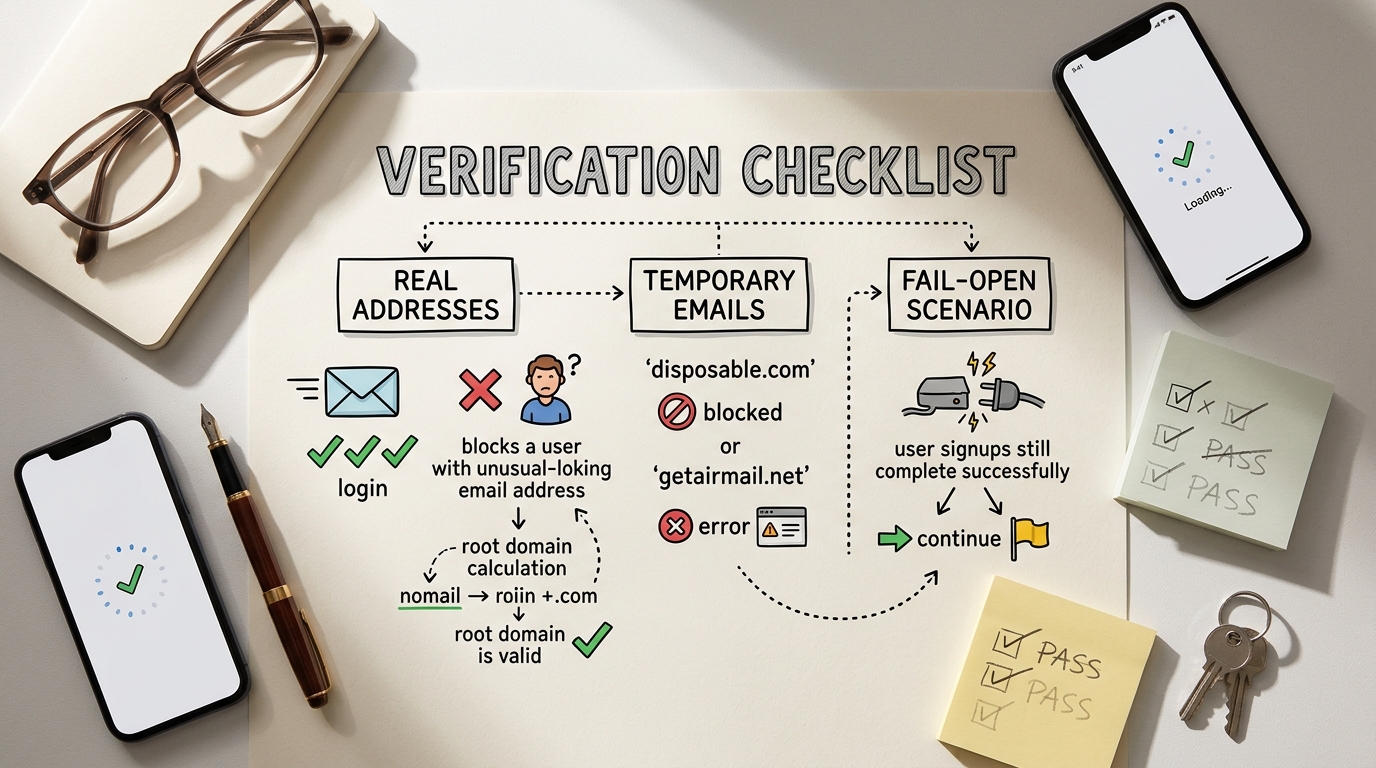
- Test with a known burner address like
test@mailinator.comto confirm it is blocked with a 400 status. - Verify that a standard address like
personal@gmail.compasses through without any delays. - Manually trigger an API timeout in your code to ensure the fail-open logic allows the signup to complete.
- Check that your normalization logic correctly handles uppercase letters and trailing spaces in the email input.
- Confirm that the middleware is applied to all relevant entry points, including newsletter signups and account updates.
Building a Spam-Proof Future
Securing your registration flow against temporary emails is an ongoing effort rather than a one-time fix. As burner services evolve to bypass filters, your detection methods must remain dynamic and data-driven. By moving away from static lists and toward real-time API verification, you protect your infrastructure and your marketing ROI.
Combining a fast detection service with local caching via Redis provides the best of both worlds: high accuracy and minimal latency. This approach ensures that your user base remains high-quality and your sender reputation stays intact. Start by auditing your current signup flow and implementing a basic middleware check today.
Frequently Asked Questions
Is it safe to block all disposable emails?
Yes, for most SaaS businesses, blocking these addresses is standard practice to prevent trial abuse. However, if you run a privacy-focused tool, you might choose to flag these users for manual review instead of a hard block.
How often should I update my local blocklist?
If you are using a local NPM package or a static JSON list, you should update it at least once a week. These lists grow by hundreds of domains daily, and a month-old list is essentially obsolete.
Will blocking these emails affect my SEO?
No, email validation occurs on the server side during a POST request and has no impact on how search engines crawl or rank your pages. It only affects the registration and form submission experience.
What is a 'Fail-Open' strategy?
Fail-open means that if your validation service is unreachable, your system defaults to allowing the user to sign up. This prevents technical glitches in your security layer from stopping legitimate customers from joining your platform.
Can I use this for newsletter signups?
Absolutely. In fact, newsletter forms are often the biggest targets for bot-driven signups that can quickly inflate your subscriber costs while tanking your open rates.